Web UI
The plugin has its own version numbers. 0.3.x works with operator 0.2.x — see Compatibility and the Web UI release notes.
The Web UI is the interactive surface for Mirops — a Headlamp plugin (React + TypeScript) that visualizes the logical mirror next to the live cluster Headlamp already talks to. It shows the part a terminal can't: the dependency graph, where risk sits right now, and the upgrade verdict.
It adds a Mirops section to the Headlamp sidebar with two pages.
Cluster Mirror
The landing page — the cluster's state right now, from the ClusterMirror:
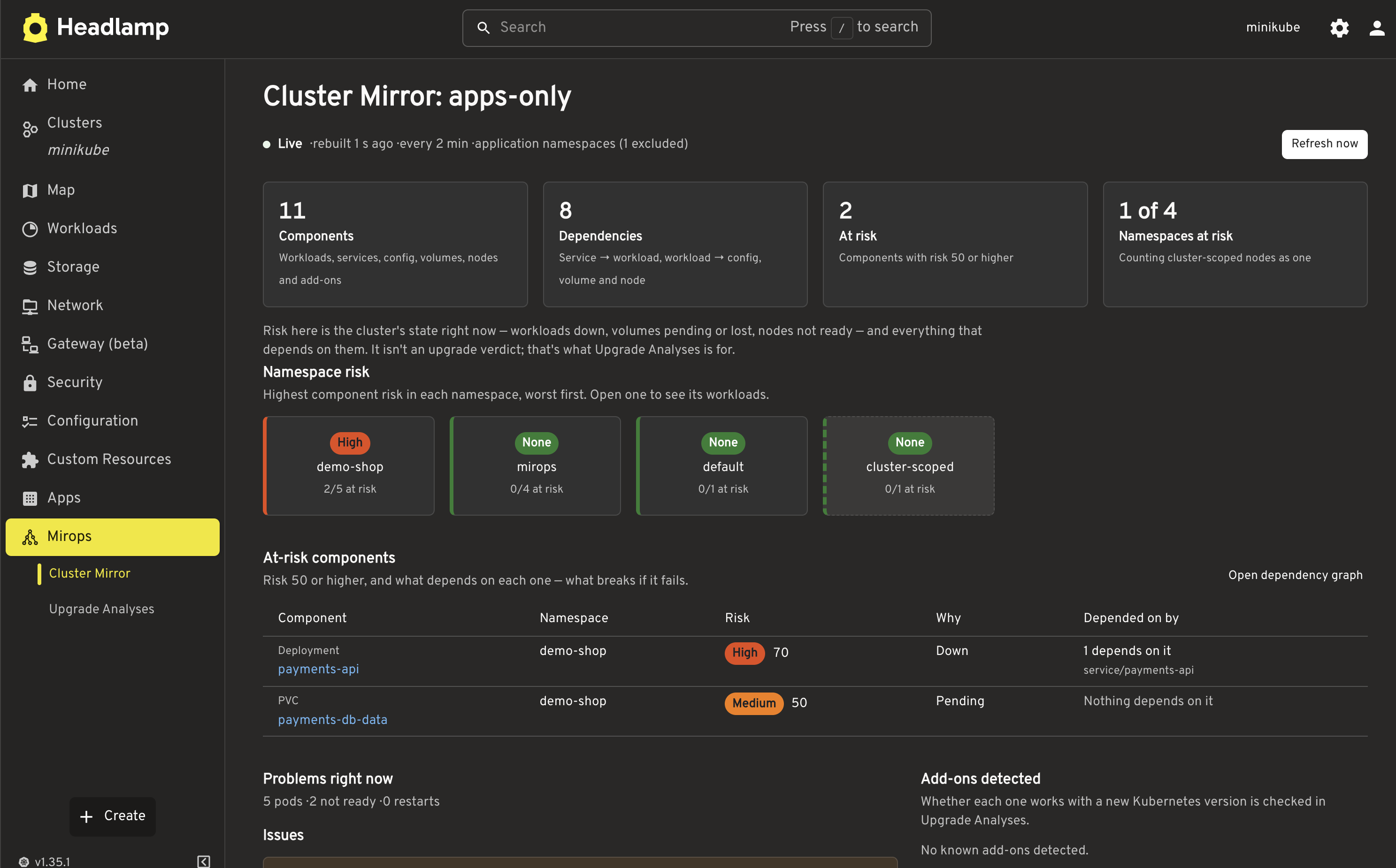
- Live header — when the mirror was last rebuilt, how often it rebuilds, its scope, and a Refresh now button. Rebuild errors show inline.
- Summary — components, dependencies, components at risk, and namespaces at risk.
- Namespace risk — a heatmap of the highest component risk per namespace, worst first.
- At-risk components — every component with risk 50 or higher, what depends on it, and where its risk comes from — plus the full dependency graph on demand (nodes colored by risk, shaped by type, draggable to untangle).
- Problems right now, add-ons detected, and the workload inventory — deployments, statefulsets, daemonsets, jobs, PVCs, standalone pods — behind an only show problems toggle.
The page opens on the list of mirrors — status (Live, Building, Error), components, components at risk, where each report is written, and when it was last rebuilt; a name opens that mirror. New mirror opens a form to create one: name (default suggested), refresh interval, scope, excluded namespaces, and report destination — file, S3, Azure Blob or PVC, with the same fields as an UpgradeAnalysis. Most clusters need one mirror; add another for a different scope, destination or interval. With none, the page offers New mirror and the YAML to apply with kubectl.
Upgrade Analyses
What a version upgrade adds on top of the mirror:
- Upgrade decision — the go/no-go verdict (
SAFE | WARNING | CRITICAL | ERROR) with a unified Findings panel of blockers and warnings. - Readiness score — a 0–100 gauge on its own health axis, separate from the verdict, with its breakdown as status bars.
- Upgrade impact — for each add-on the target version breaks, everything that depends on it.
- Add-on compatibility and upgrade checks — deprecated APIs, CPU/memory pressure, pod drop and restarts.
- AI insights — the AI reasoning and score when enabled, with a clear banner if the AI call failed.
- Remediation plans — review, approve, and selectively execute operator-proposed actions.
- Create & configure — author an
UpgradeAnalysisfrom the UI: target version, scope, report destination, and AI settings.
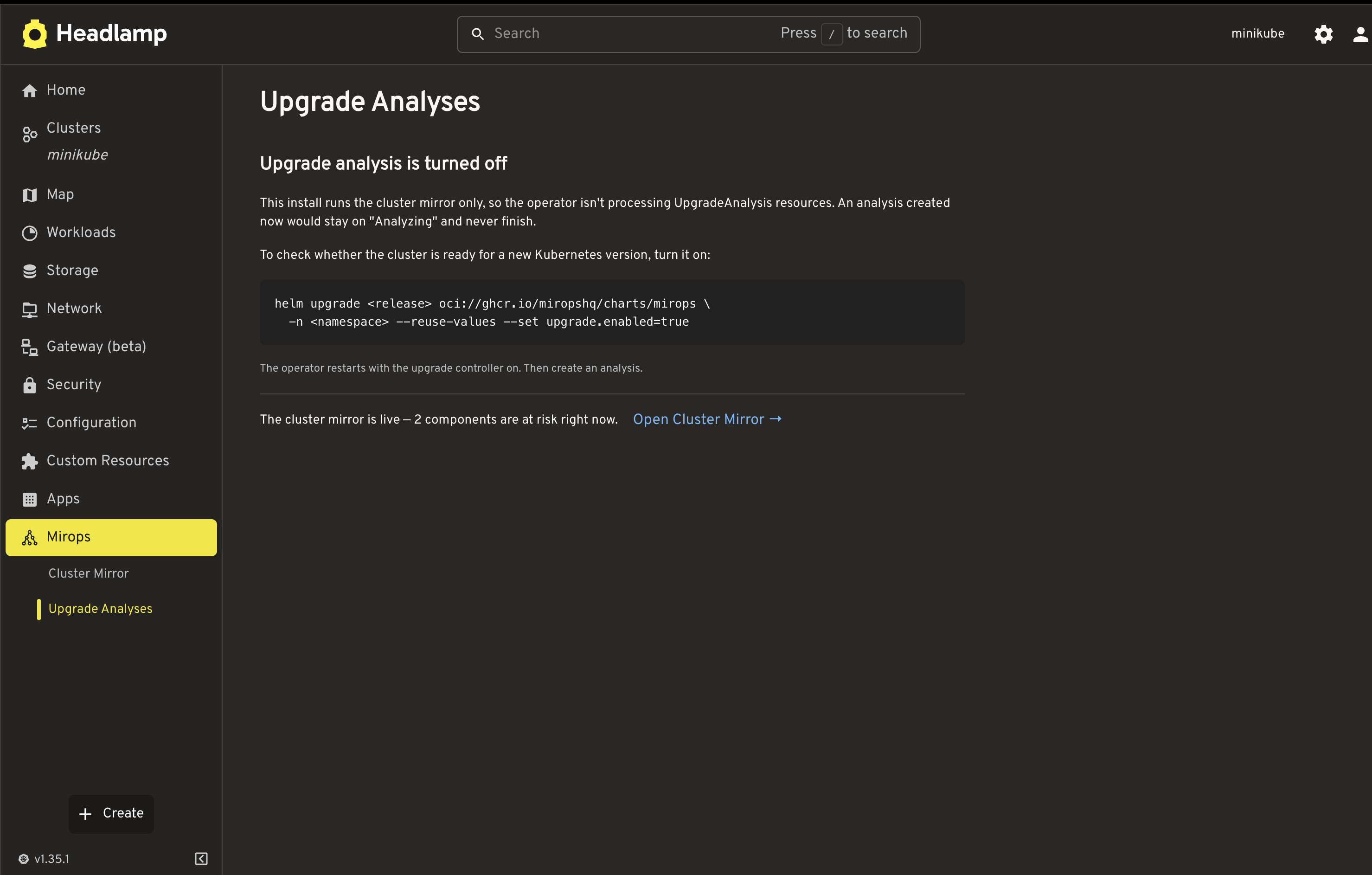
When the operator runs with upgrade analysis off (Helm upgrade.enabled=false), this page says so and shows the command to turn it on, instead of an analysis that would never finish. The cluster's current state is linked from each analysis to the Cluster Mirror page.
Plugin and operator versions
| Plugin | Operator | What it adds |
|---|---|---|
| 0.3.1 | 0.2.0 – 0.2.1 | The list of mirrors, and creating a ClusterMirror from the UI. Reads the mirror's <name>.mirops report from operator 0.2.1, and its <name>.mirror report from 0.2.0. |
| 0.3.0 | 0.2.0 | The Cluster Mirror page; upgrade analyses show only what the upgrade adds; the turned-off notice; readable risk badges. With an older operator the Cluster Mirror page says it needs 0.2.0, and Upgrade Analyses keeps working. |
| 0.2.0 | 0.1.0 | The score breakdown as status bars in the header, above the findings. |
| 0.1.0 | 0.1.0 | Initial release. |
How reports reach the UI
The plugin reads both reports — a mirror's and an analysis's, each <name>.mirops — through Headlamp's backend service proxy to the operator's in-cluster report endpoint — so remote destinations (S3/Blob/PVC) are read back with the operator's own credentials, never the browser's.
Install
Pick how you run Headlamp. The plugin reads the reports from the operator's namespace — mirops unless you set it.
In-cluster Headlamp, from the plugin image
The plugin ships as a public container image; an initContainer copies it into Headlamp's plugin directory on startup — no pull secret required. This is the way to use an operator namespace other than mirops.
# 1. Add the Headlamp Helm repo
helm repo add headlamp https://kubernetes-sigs.github.io/headlamp/
helm repo update

# 2. Install Headlamp with the Mirops plugin
helm install headlamp headlamp/headlamp -n headlamp --create-namespace \
  -f headlamp-values.yaml

# 3. Access it
kubectl -n headlamp port-forward svc/headlamp 8080:80
open http://localhost:8080
The headlamp-values.yaml loads the plugin image and tells it where the operator lives:
config:
  pluginsDir: /headlamp/plugins

initContainers:
  - name: mirops-plugin
    image: ghcr.io/miropshq/mirops-headlamp-plugin:latest
    imagePullPolicy: Always
    env:
      # Namespace where the operator (and its mirops-reports Service) is installed.
      # Defaults to "mirops"; change it if you installed the operator elsewhere.
      - name: MIROPS_NAMESPACE
        value: mirops
    command:
      - sh
      - -c
      - |
        mkdir -p /headlamp/plugins/mirops
        cp -r /plugins/mirops/* /headlamp/plugins/mirops/
        printf '{"reportsNamespace":"%s"}' "$MIROPS_NAMESPACE" > /headlamp/plugins/mirops/config.json
    volumeMounts:
      - name: plugins
        mountPath: /headlamp/plugins

volumeMounts:
  - name: plugins
    mountPath: /headlamp/plugins

volumes:
  - name: plugins
    emptyDir: {}
The mirops CRs are cluster-scoped, so they don't tell the plugin where the operator's report Service lives — MIROPS_NAMESPACE does. If you install the operator in a namespace other than mirops, set it here. When CI publishes a new image, pick it up with kubectl -n headlamp rollout restart deploy/headlamp.
In-cluster Headlamp, from Artifact Hub
The plugin is published on Artifact Hub under the mirops organization. Headlamp's chart can install it from there with its plugin manager — no image, no initContainer:
# headlamp-values.yaml
pluginsManager:
  enabled: true
  configContent: |
    plugins:
      - name: mirops
        source: https://artifacthub.io/packages/headlamp/mirops/mirops
        version: 0.3.1
helm install headlamp headlamp/headlamp -n headlamp --create-namespace -f headlamp-values.yaml
Installed this way the plugin has no config.json, so it reads the reports from the mirops namespace — the Helm chart's default. If the operator runs elsewhere, use the plugin image above.
Headlamp desktop
Open Plugin Catalog, search for Mirops, and install it — the catalog lists it from Artifact Hub. Like the Artifact Hub install, it reads the reports from the mirops namespace.
- Full values file and source: github.com/miropshq/mirops-headlamp-plugin